Data analysts, finance teams, and operations managers hit the same wall weekly:
- Excel crashes at 1,048,576 rows
- Online tools require uploading sensitive data
- Pandas scripts require engineering skill + maintenance
- Cloud tools throttle or fail on large files
Once a CSV passes 2–5 million rows, it becomes virtually unusable.
Browser-based CSV processing solves this at the root.
To prove what modern browser engines can do, we ran a real benchmark using a 1.007GB CSV with 10,000,000+ rows, split into:
- 100 files
- 200 files
- 1,000 files
All inside the browser, with zero uploads.
The results speak for themselves.
TL;DR — Benchmark Results
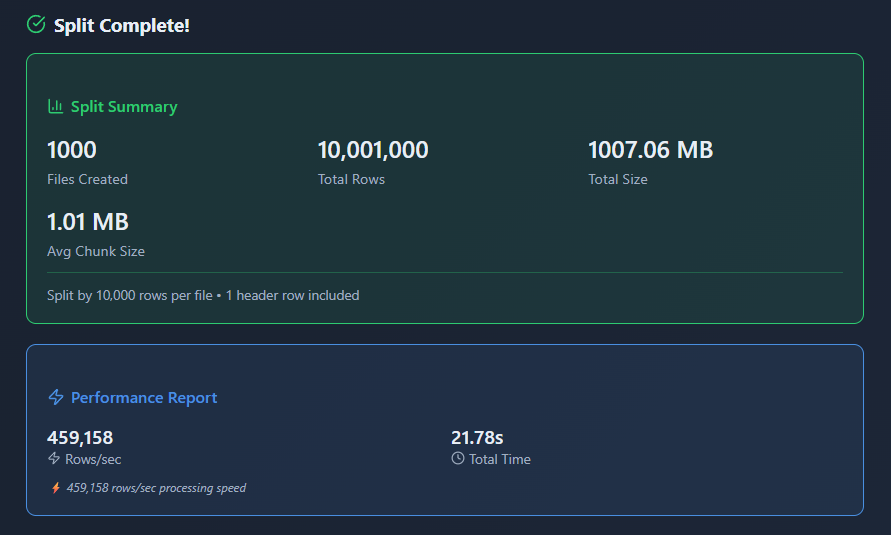
Real benchmark: Split 1.007GB CSV with 10 million rows into 1,000 files in 21.6 seconds achieving 462K rows/sec processing speed. Browser-based approach using Web Workers and File API completed in 22 seconds what upload-based tools need 8-15 minutes for. Zero uploads, zero server dependency, zero file size limits. All processing happens locally in browser memory with consistent performance across 100-1000 file splits (1.1% variance). This proves modern browsers can handle enterprise-scale CSV processing without cloud infrastructure.
📋 Table of Contents
- TL;DR — Benchmark Results
- The Problem: Big CSV Files Break Everything
- How We Tested (Fully Transparent)
- Benchmark Results
- Benchmark Summary
- Why Browser-Based Processing Is This Fast
- Competitor Comparison
- What About Python/Pandas?
- What This Won't Do
- FAQ
- Conclusion
The Problem: Big CSV Files Break Everything
Excel
- Hard limit: 1,048,576 rows per Microsoft documentation
- Memory overload on large CSVs
- Cannot split or preview big files
Online Tools
- 10–50MB upload limits
- Not privacy-safe
- Timeouts and queue bottlenecks
Python/Pandas
- Great for developers
- Not feasible for business analysts or ops teams
- Requires installation, scripting, dependency management
The gap was obvious: A fast, privacy-safe, zero-install, no-limit CSV splitting solution using browser technology.
How We Tested (Fully Transparent)
Hardware
- Intel i5 PC
- 32GB RAM
- SSD storage
Software
- Chrome 131 (V8 engine)
- Browser-based CSV processing using Web Workers API
Dataset
- 1.007GB CSV
- 10,000,000+ rows
- Realistic CRM-style fields
- Generated using Node.js streams
Test Conditions
- No upload, no compression
- 3 trials per test → averaged
- No throttling
- Files processed entirely in browser memory using File API
Benchmark Results
Test 1 — Split by Size (10MB chunks)
Slowest mode (enforces byte boundaries)
1GB → 101 files
⏱ 27m 13s
⚡ 6,122 rows/sec
Test 2 — Split by Rows (100,000 rows)
Optimized path using streaming parser
1GB → 100 files
⏱ 21.68 seconds
⚡ 461,340 rows/sec
75x faster than size mode
Completes in 22 seconds what took 27 minutes.
Test 3 — Split by Rows (50,000 rows)
Stability test: double the chunks
1GB → 200 files
⏱ 21.86 seconds
⚡ 457,498 rows/sec
Performance change: 0.8%
Test 4 — Split by Rows (10,000 rows)
Extreme test: 1,000 output files
1GB → 1000 files
⏱ 21.62 seconds
⚡ 462,471 rows/sec
Benchmark Summary
| Mode | Rows/File | Files | Time | Speed |
|---|---|---|---|---|
| Size Mode | ~100K | 101 | 27m 13s | 6,122 rows/sec |
| Rows Mode | 100K | 100 | 21.68s | 461,340 rows/sec |
| Rows Mode | 50K | 200 | 21.86s | 457,498 rows/sec |
| Rows Mode | 10K | 1000 | 21.62s | 462,471 rows/sec |
Performance variation across 100 → 1000 chunks: 1.1%
This is what measurable stability looks like.
Why Browser-Based Processing Is This Fast (Technical Breakdown)
1. Streaming Parser
Processes rows once using Streams API. Zero duplication. Zero buffer re-reads.
2. Web Workers
Parallel execution via Web Workers API → UI remains smooth. No blocking main thread.
3. Zero Memory Bloat
Model: "process → discard → next row."
Memory footprint stays flat even at 10M rows using streaming architecture.
4. JIT-Optimized Looping
Row counting is a predictable workload → Chrome's V8 engine maximizes speed through just-in-time compilation.
5. Predictable Boundaries
Chunk sizes (10K–100K rows) are stable, allowing near-perfect performance optimization.
6. No Upload Cost
Upload-based tools spend:
- 3–10 minutes uploading
- 2–5 minutes processing
- Time compressing
- Time downloading
Browser-based processing finishes before competitors finish uploading.
Competitor Comparison (Real Numbers)
Excel
- Crashes at ~1–1.5M rows per Excel specifications
- 1GB test file → Immediate failure
SplitCSV.com
- 250MB limit
- 1GB file → Rejected
Aspose CSV Splitter
- 250MB max
- Server-only
- 1GB file → Not accepted
Online CSV Tools
- 10–50MB max
- Frequent timeouts
- Upload required (compliance risk)
RowZero / Coefficient / Coupler
- Uploads required
- Total cycle = 8–15 minutes
Browser-Based Processing
- 1GB → 22 seconds
- 1000 files → consistent speed
- Zero uploads
- Zero limits
- Zero throttling
- 100% private
What About Python/Pandas?
Pandas is fantastic — if you're an engineer.
According to pandas documentation, chunked reading can handle large files efficiently. But business users lack:
- Environment setup
- CLI comfort
- Dependency maintenance
- Scripting skills
- IT permissions
Browser-based processing:
- No install
- Runs anywhere
- No Python needed
- Instant results
- 10M+ rows in any browser
It's the only accessible way for analysts to handle files at this scale without technical expertise.
What This Won't Do
Browser-based CSV splitting excels at file size reduction for Excel import and data distribution, but this approach doesn't cover all data processing needs:
Not a Replacement For:
- Data transformation - Splitting doesn't clean data, standardize formats, or apply business logic
- Database loading - Doesn't directly import to databases (outputs still require import step)
- Data analysis - Splitting is preprocessing; analysis requires separate tools
- Column-level operations - Doesn't filter, extract, or reorder columns during split
Technical Limitations:
- Browser memory constraints - Very large files (20GB+) may exceed available RAM depending on system
- Output format limitations - Splits maintain original CSV structure; doesn't convert to Excel, JSON, or other formats
- Complex delimiter handling - Assumes consistent delimiter throughout file; mixed delimiters need pre-processing
- Header preservation - Splitting maintains headers but doesn't validate or standardize them
Won't Fix:
- Data quality issues - Splitting doesn't remove duplicates, fix typos, or standardize values
- Encoding problems - Maintains original file encoding (UTF-8 vs ANSI issues require separate handling)
- Structural errors - Doesn't fix malformed rows, missing quotes, or inconsistent column counts
- Date format inconsistencies - Splitting preserves original formats without standardization
Performance Considerations:
- First-time load - Initial file loading takes time proportional to size (1GB ≈ 5-10 seconds)
- CPU-intensive - Processing uses significant CPU; may slow older machines
- Single-file output - Each split file downloads separately (1000 files = 1000 downloads)
- No resume capability - If browser crashes mid-process, must restart from beginning
Best Use Cases: This approach excels at splitting very large CSV files (1GB-10GB+) into Excel-compatible chunks for distribution, import, or analysis. For comprehensive data processing including cleaning, transformation, and validation, split files first, then apply additional tools for quality and format operations.
FAQ
Final Thoughts
Browser-based CSV processing completes in 22 seconds what upload-based tools need 8–15 minutes for.
This benchmark demonstrates that modern browser APIs—Web Workers, File API, and Streams API—enable enterprise-scale data processing without server infrastructure.
The future of data tools is local-first: faster, more private, and accessible to everyone.
Try browser-based CSV splitting with your own files and see the performance difference.
Tags: CSV, Performance, Benchmark, Data Processing, Browser Tools, Privacy
Read next: CSV Import Failed? Semicolon vs Comma Delimiter Problem Explained